 InspectCam
Free on Google Play
Flashlight and camera on at the same time — for inspecting dark, tight spaces
On iPhone and most Android phones, the flashlight switches off the second you open the camera. On Android, InspectCam holds both on together — so you can see into dark, tight spaces and take the photo without losing the light.
- Now onGoogle Play
- Coming soon to theApp Store
Free to use · No ads · Android only

Why your flashlight goes out when you open the camera
The LED beside your camera is the camera's flash, not a separate torch. Open a camera app and it takes the flash with it. Your light dies. This is true on both platforms.
Setting flash to "on" doesn't fix it — that fires at the moment of capture. It lights the photo, not the preview. You're still aiming blind.
InspectCam holds the light on with a live view, so nothing is fighting for the LED. Full explanation, and the video-mode workaround.
Three levels
Free and Premium are set. Pro is planned — see the note below.
Free
$0
In the app today
- The light comes on when you open the app and stays on: through photos, through video, and when you come back to it
- See what the camera sees
- Take photos
- Record video, with sound
- Never stops your music, even while you record — why most apps do
- One-tap zoom levels — whichever ones your phone exposes
- Pinch to zoom, and reset zoom
- Both cameras on screen at once. The front one is a second view, not a second recording, and only some phones can do it
- Tap the screen to focus
- A marker shows when focus is held — tap to release
- Screen won't sleep while you're working
- Use the screen as a selfie light for video, with your camera view in a window you can move and resize
- Shortcut through to your gallery
Premium
One payment$6.99 one time, yours for life
Pay once and it stays unlocked.
- Countdown before the photo is taken
- Lock the screen so a stray hand can't turn your light off
- Dim the light: the screen lamp on any phone, the rear LED only where the phone allows it
- Volume buttons do one job you choose: shutter, zoom or brightness
- Flip the picture left-to-right
Pro
Coming soon
For documentation and reporting.
Pro will add
- Group photos and videos into jobs, by vehicle, unit or property
- Date, time and location stamped onto every capture
- Export a PDF report you can send to a customer, tenant or insurer
Premium is a one-time $6.99 unlock, bought inside the app through Google Play. The free version is fully usable without it. Pro isn't built and has no date.
| Feature | Free | Premium | Pro — coming soon |
|---|---|---|---|
| Light comes on at launch and stays on through photo and video | Yes | Yes | Yes |
| See what the camera sees | Yes | Yes | Yes |
| Take photos | Yes | Yes | Yes |
| Record video, with sound | Yes | Yes | Yes |
| Never stops your music, even while you record | Yes | Yes | Yes |
| One-tap zoom levels — whichever ones your phone exposes | Yes | Yes | Yes |
| Pinch to zoom | Yes | Yes | Yes |
| Reset zoom | Yes | Yes | Yes |
| Both cameras on screen at once — front is a view, not a second recording, and only some phones can | Yes | Yes | Yes |
| Tap the screen to focus | Yes | Yes | Yes |
| A marker shows when focus is held | Yes | Yes | Yes |
| Screen won't sleep while you're working | Yes | Yes | Yes |
| Use the screen itself as a lamp | Yes | Yes | Yes |
| Move and resize the lamp window | Yes | Yes | Yes |
| Shortcut through to your gallery | Yes | Yes | Yes |
| Countdown before the photo is taken | —No | Yes | Yes |
| Lock the screen so a stray hand can't turn your light off | —No | Yes | Yes |
| Dim the light: the screen lamp on any phone, the rear LED only where the phone allows it | —No | Yes | Yes |
| Volume buttons: shutter, zoom or brightness | —No | Yes | Yes |
| Flip the picture left-to-right | —No | Yes | Yes |
| Group photos and videos into jobs, by vehicle, unit or property | —No | —No | Yes |
| Date, time and location stamped onto every capture | —No | —No | Yes |
| Export a PDF report you can send to a customer, tenant or insurer | —No | —No | Yes |
Where it earns its place
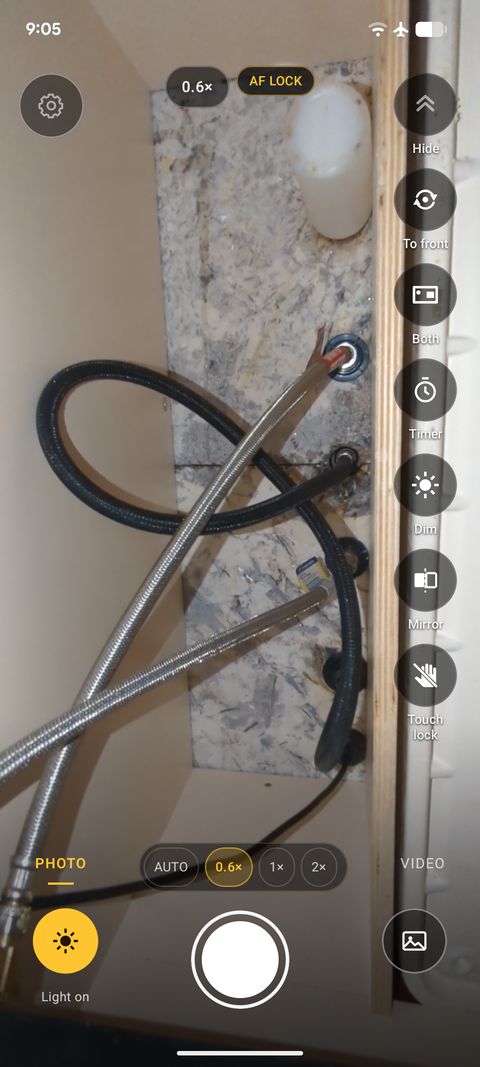
Under the sink 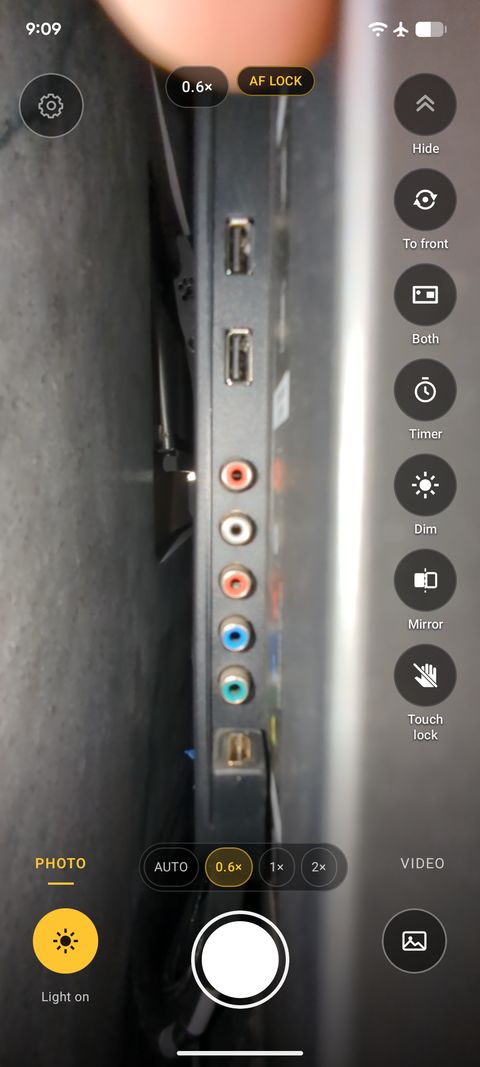
Behind the TV


Real screenshots from the app, taken on a phone. No edits.
Engine bays
Read a part number behind the block on the screen, with the light already on. No third hand for a torch.
Wall cavities
Checking a stud line or a cable run through a hole too small to look through.
Under sinks
See the back of a trap or a shut-off valve in a cupboard with no light, or record a short video of the drip to show someone. The light stays on while you record.
Crawlspaces and lofts
A light that stays on and a live view, so the phone goes where your head will not. Record a short video to show someone what is up there.
Behind the furniture
Something down the back of the sofa, a drawer or a car seat. The light is on as the camera opens, so you can see where it went before you move anything.
Behind the TV
See which cable goes where before you unplug anything. Read the port labels on the screen, or record a short video first.
Breaker boxes
Tiny labels in a closet with no light. Pinch or tap a zoom preset to get close, then tap the label to focus.
Somewhere hot, like an engine bay or a loft in summer: if your phone gets very hot, Android may switch the light off to protect it. That's a safeguard, not a fault.
Guides
Answers to the questions a store listing can't cover. Written by Andre Gaz, who builds the app.
-
Borescope not detected on Android
Nine causes in order of likelihood. The cable is usually the answer.
-
Flashlight goes out when the camera opens
Why both platforms do it, and what actually keeps the light on.
-
Keep the flash on while taking a picture
Flash only lights the photo, so you aim in the dark. How to keep the light on while you line it up.
-
Your selfie video is too dark
Front flash fires for photos only. It does nothing for video.
-
Recording video stops your music
Audio focus, and the apps that never ask for it.
-
Why some phones can't use both cameras
The phone answers, not the app. No update adds it.
-
Wi-Fi scope keeps disconnecting
Your phone is leaving on purpose. The setting that stops it.
-
Does your phone support USB OTG?
A two-minute test that beats any checker app.
-
Which borescope specs matter
Focal distance decides sharpness. Most resolution figures are fiction.
-
USB borescopes and iPhone
The standard kind don't, and Apple's own documentation says why.
What it asks of you
- No ads
- The free version is fully usable on its own
Using a borescope with your phone?
The compatibility list is empty for now: no scope is listed until one has been connected and verified, with the date. If a scope isn't being detected, the Android troubleshooting page works through the causes in order. On iPhone, start with why USB borescopes don't work there.
Get InspectCam
- Now onGoogle Play
- Coming soon to theApp Store
InspectCam is on Google Play for Android. There is no iPhone version, and no date to promise for one.